

A flaky test is a test that passes on one run and fails on another without any change to the code under test or to the test itself. Its result is nondeterministic, so the same commit can produce a green pipeline and a red one.
Most developers meet one the same way: CI fails, they hit rerun, the build goes green, and the pull request merges. The failure still matters. Treat the passing retry as evidence to investigate, not as proof that the problem disappeared.
What causes flaky tests
Section titled “What causes flaky tests”Most flakes match one of these patterns:
| Pattern | Typical signal | Usual fix |
|---|---|---|
| Shared state | The test passes alone but fails after another test. | Reset data, files, mocks, and process state for each test. |
| Fixed ports or names | Parallel tasks collide or one task cannot start a service. | Allocate isolated ports, directories, and test data. |
| Timing assumptions | The failure follows a slow machine or delayed response. | Wait for a defined event or state, not an arbitrary delay. |
| Test-order dependence | A different order changes the result. | Make each test create and clean up its own prerequisites. |
| External services | Network, API, or third-party failures appear in the logs. | Stub the dependency where practical, or isolate and monitor the integration. |
A failure after a source or configuration change may be a regression instead. Fix a failure that reproduces with the changed inputs. Do not retry it until it passes.
How to fix a flaky test
Section titled “How to fix a flaky test”Work through the failed test in this order:
- Re-run the failed test or test task by itself. A full-pipeline retry repeats work that already passed, wastes compute, and delays the result.
- Compare the failed attempt with the successful attempt.
- Check the logs, machine image, environment values, network calls, and test order.
- Fix the cause that differs between attempts, using the table above to narrow it down.
- Quarantine the test only when the team cannot fix it immediately.
Record an owner and review date for each quarantine. A quarantine protects the pipeline, but it also reduces test coverage.
Flaky tests in Playwright, Cypress, Jest, and Vitest
Section titled “Flaky tests in Playwright, Cypress, Jest, and Vitest”End-to-end tests flake more than unit tests because they carry real browsers, real servers, and real network calls. Both major e2e runners can retry a failed test - retries in playwright.config.ts, and retries (with separate runMode and openMode values) in the Cypress config. Playwright even labels a fail-then-pass result as flaky in its report.
A framework retry runs on the same machine, so a port conflict or a process leaked by an earlier test is still there when the test runs again. The record is also scoped to one run's report, and nothing accumulates into a picture of which tests flake the most across your CI.
Nx Cloud retries on a different machine to rule out the environment, and tracks results per task across runs. Automated task splitting creates one task per test file for @nx/playwright, @nx/cypress, @nx/jest, and @nx/vitest, so only the failed spec file runs again.
A passing retry does not clear a failure
Section titled “A passing retry does not clear a failure”A rerun that goes green tells you the test is nondeterministic. It does not tell you which of the patterns above caused it, and it does not tell you whether the underlying race can also corrupt production behavior. Teams need evidence that survives across CI runs rather than one developer's recollection that "that one is always flaky".
Detect flaky tests automatically with Nx Cloud
Section titled “Detect flaky tests automatically with Nx Cloud”Nx runs a test command as a task. A task can run one test file, a group of files, or an entire test suite. Nx creates a hash from that task's inputs each time it runs.
When one task hash both fails and succeeds, Nx Cloud knows that task is flaky. A task that fails once after a new commit has a new hash and may be a regression. A task that passes and fails with one hash - even on different machines, days apart - is nondeterministic.
When a known flaky task fails, Nx Cloud sends it to a different Nx Agent. It makes at most two attempts in total. The retry targets the failed work instead of the complete pipeline.
Enable flaky test detection to use this behavior in your CI pipeline.
Choose which flaky test to fix first
Section titled “Choose which flaky test to fix first”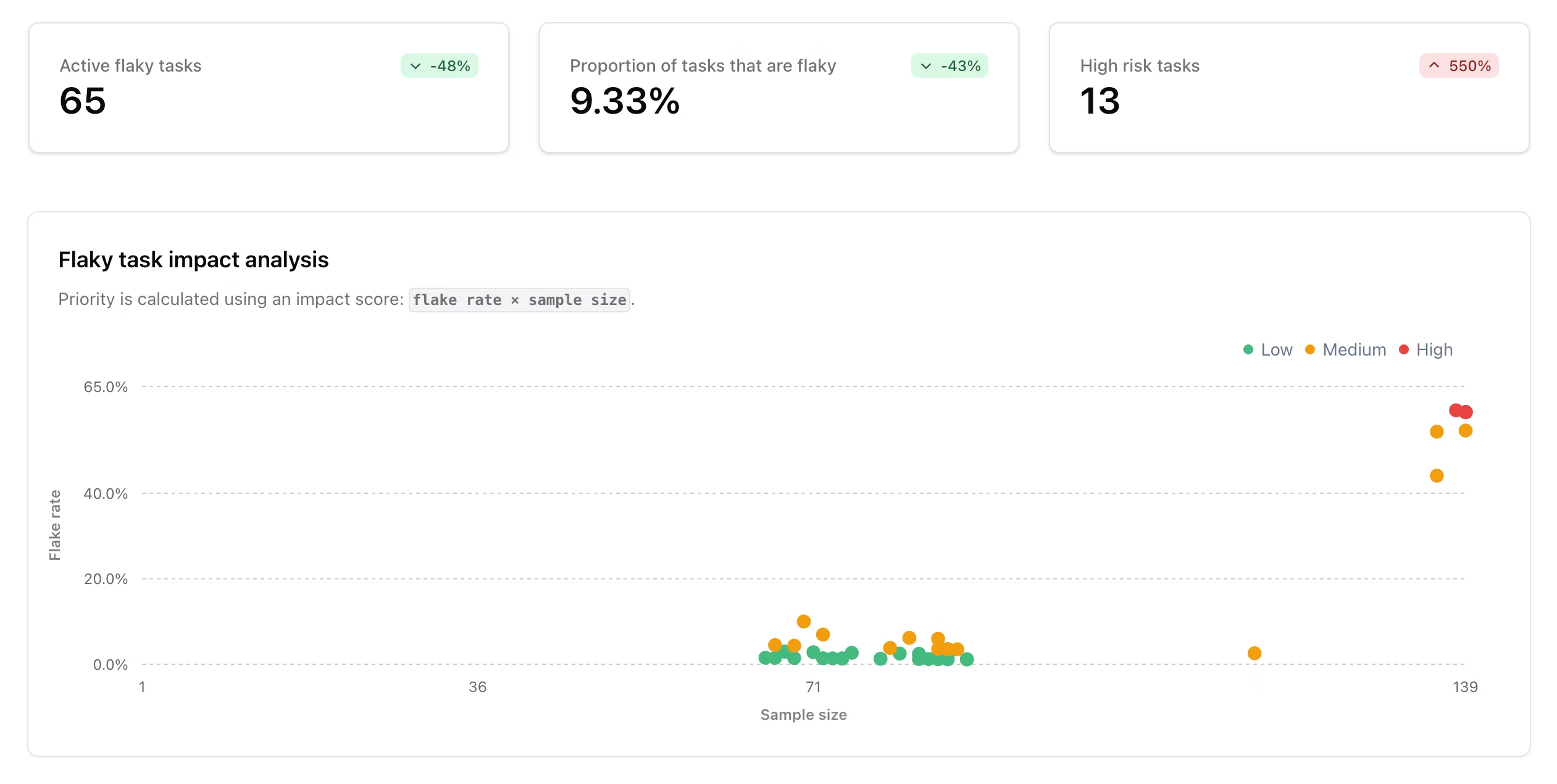
The Nx Cloud dashboard shows active flaky tasks, average flake rate, and high-risk tasks. It ranks tasks by impact, which combines a task's flake rate with how often it runs.
Start with a frequently run task that fails often. It blocks more pull requests and wastes more CI time than a task with one isolated failure. Open the task to inspect its attempts, logs, and execution environments before you change the test. The dashboard is part of flaky task analytics in Nx Cloud.
Keep task inputs complete
Section titled “Keep task inputs complete”A test can appear flaky when its execution context changed but the task did not include that change in its inputs. Include configuration, environment values, generated files, and other dependencies that affect the result.
How caching works explains how Nx uses task inputs. Task sandboxing can find undeclared task dependencies.
For the wider CI design, use Monorepo CI best practices. It covers affected runs, caching, distribution, test splitting, and flaky-task handling together.